
How to Read a Commercial Insurance Card
A practical, five-minute training for your medical front desk team. Learn what to look for on both sides of an insurance card, what to capture at check-in, and why verifying coverage matters.
A smooth patient visit starts long before the physician walks into the exam room. It starts with getting the details right at check-in, including the patient's insurance information.
Something as simple as entering the wrong member ID or overlooking a network name can create claim rejections, payment delays, and frustrating conversations with patients.
The challenge? Insurance cards aren't all designed the same way. Information appears in different places, and it's not always obvious which numbers matter.
In this short training, I'll walk you through how to read a commercial insurance card, what each field means, and how to use that information correctly.
Watch the video, then keep the step-by-step guide below handy for your next patient check-in.
What's in This Training (and Who It's For)
What You'll Learn
In about five minutes, you'll learn how to:
- Identify the insurance company, plan name, member ID, and group number.
- Recognize common plan types, including HMO, PPO, EPO, and POS.
- Find the patient's network information and listed copays.
- Distinguish pharmacy information from medical insurance information.
- Locate important phone numbers, claims addresses, and electronic Payer IDs on the back of the card.
- Follow four simple check-in habits that help prevent insurance-related errors.
Who This Training Is For
This training is especially helpful if you're:
- New to working at the medical front desk or in patient access.
- A practice manager responsible for onboarding and training team members.
- A physician or practice owner who wants more consistent check-in procedures.
- A billing team member who wants to understand how front desk information affects claims.
The Short Answer
To read a commercial insurance card, review both the front and back. The front typically identifies the insurance company, plan name, member name and ID, group number, plan type, network, copays, and pharmacy information. The back usually contains member and provider services phone numbers, paper claims information, prior authorization contacts, and sometimes an electronic Payer ID. Compare the card with your practice management system and verify eligibility and benefits before the visit, because having an insurance card doesn't guarantee active coverage.
How to Read a Commercial Insurance Card, Step by Step
Getting insurance information right at check-in helps your practice submit accurate claims, avoid unnecessary delays, and communicate more clearly with patients.
These steps apply to commercial health insurance cards. Always review both sides of the card, and remember that the information printed on it doesn't replace eligibility and benefits verification.
The Front of the Card
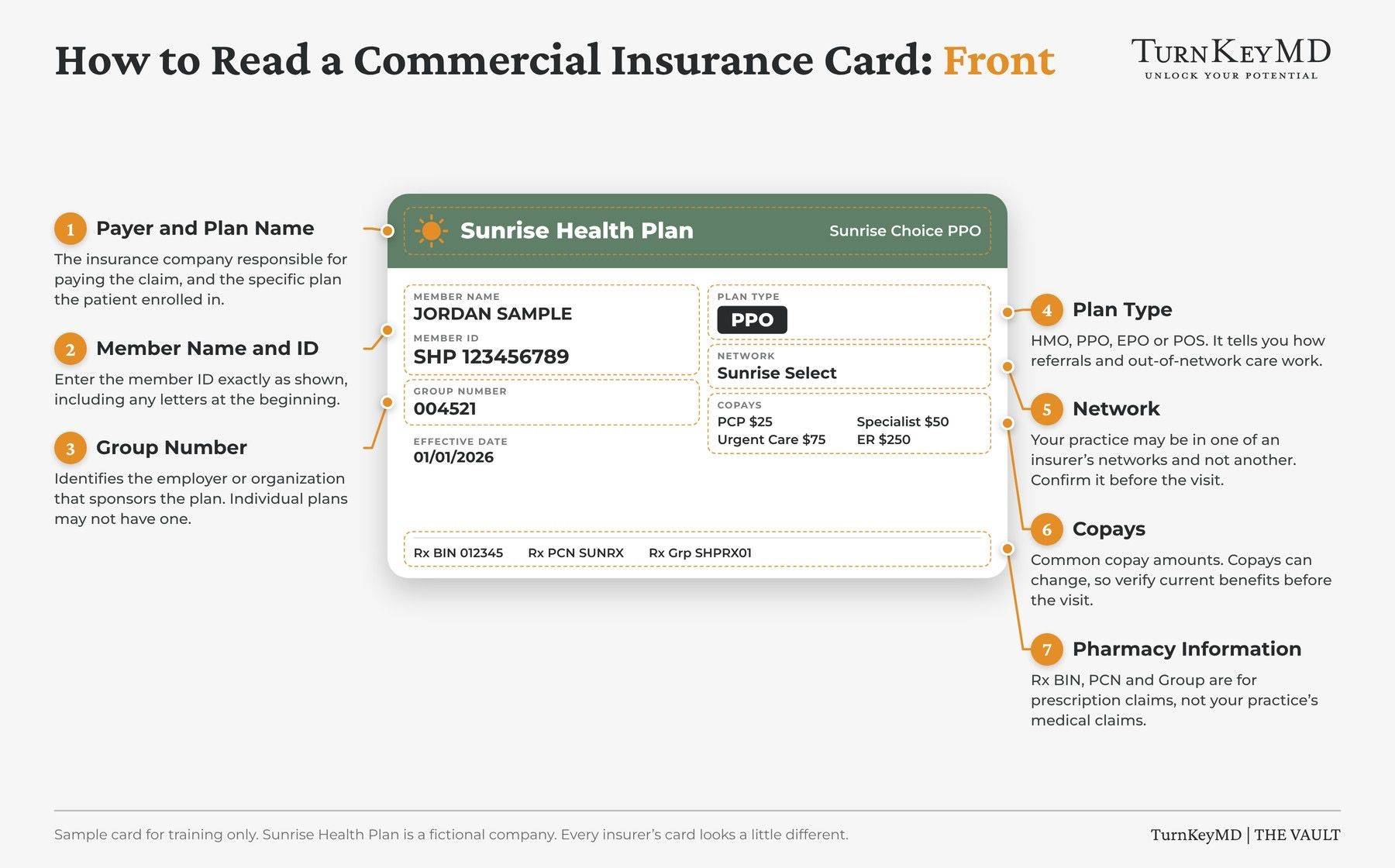
Step 1: Identify the Payer and Plan Name
Start by locating the insurance company's name and the specific plan. The payer is the company responsible for processing the claim, while the plan identifies the patient's particular insurance product. Some cards display more than one company name. When that happens, the company that processes claims is often the one your practice needs to bill. Confirm the correct payer through your practice's billing system or payer resources.
Step 2: Find the Member Name and Member ID
Locate the member's name and identification number. Check whether the patient is the subscriber or a dependent covered under someone else's policy. Enter the member ID exactly as printed, including any letters or prefixes. Even one incorrect character can cause a claim rejection.
Step 3: Locate the Group Number
The group number generally identifies the employer or organization sponsoring the insurance plan. Two patients with the same insurance company may have different benefits based on their groups. Some individual marketplace plans don't have a group number. That's normal, so don't assume information is missing simply because you don't see one.
Step 4: Recognize the Plan Type
The plan type can provide clues about network restrictions, referrals, and out-of-network benefits. Common commercial plan types:
- HMO (Health Maintenance Organization): Generally requires in-network care, a primary care provider, and referrals for certain specialists. Out-of-network services are generally limited to emergencies.
- PPO (Preferred Provider Organization): Generally offers both in-network and out-of-network benefits without requiring specialist referrals. Out-of-network care usually costs more.
- EPO (Exclusive Provider Organization): Generally covers in-network care only, except for emergencies. Specialist referrals usually aren't required.
- POS (Point of Service): Combines features of HMO and PPO plans. It commonly involves a primary care provider and referrals, while allowing some out-of-network care at a higher cost.
These are general characteristics, not guarantees. Always confirm the patient's specific plan requirements.
Step 5: Check the Network Name
A practice may participate with an insurance company without participating in every network that company offers. Look for the network name and confirm that your practice participates in the patient's specific network. If there's a possible network mismatch, address it before the visit rather than assuming the practice is in-network.
Step 6: Review Copays and Cost Sharing
Many commercial insurance cards list copays for services such as primary care visits, specialist visits, urgent care, and emergency room visits. A copay is a set dollar amount, but the amount printed on the card may not tell you everything the patient owes. Deductibles and coinsurance often aren't listed. Verify the patient's benefits and applicable cost sharing before determining what to collect.
Step 7: Identify Pharmacy Information
You may see pharmacy fields labeled Rx BIN, Rx PCN, and Rx Group. These are used for pharmacy claims, not medical claims. Be especially careful not to confuse the Rx group with the medical insurance group number.
Front of the card: see the annotated graphic below, callouts 1–7.
The Back of the Card
Turn the card over. The back contains important information your front desk and billing teams may need to verify coverage, request authorizations, and submit claims correctly.
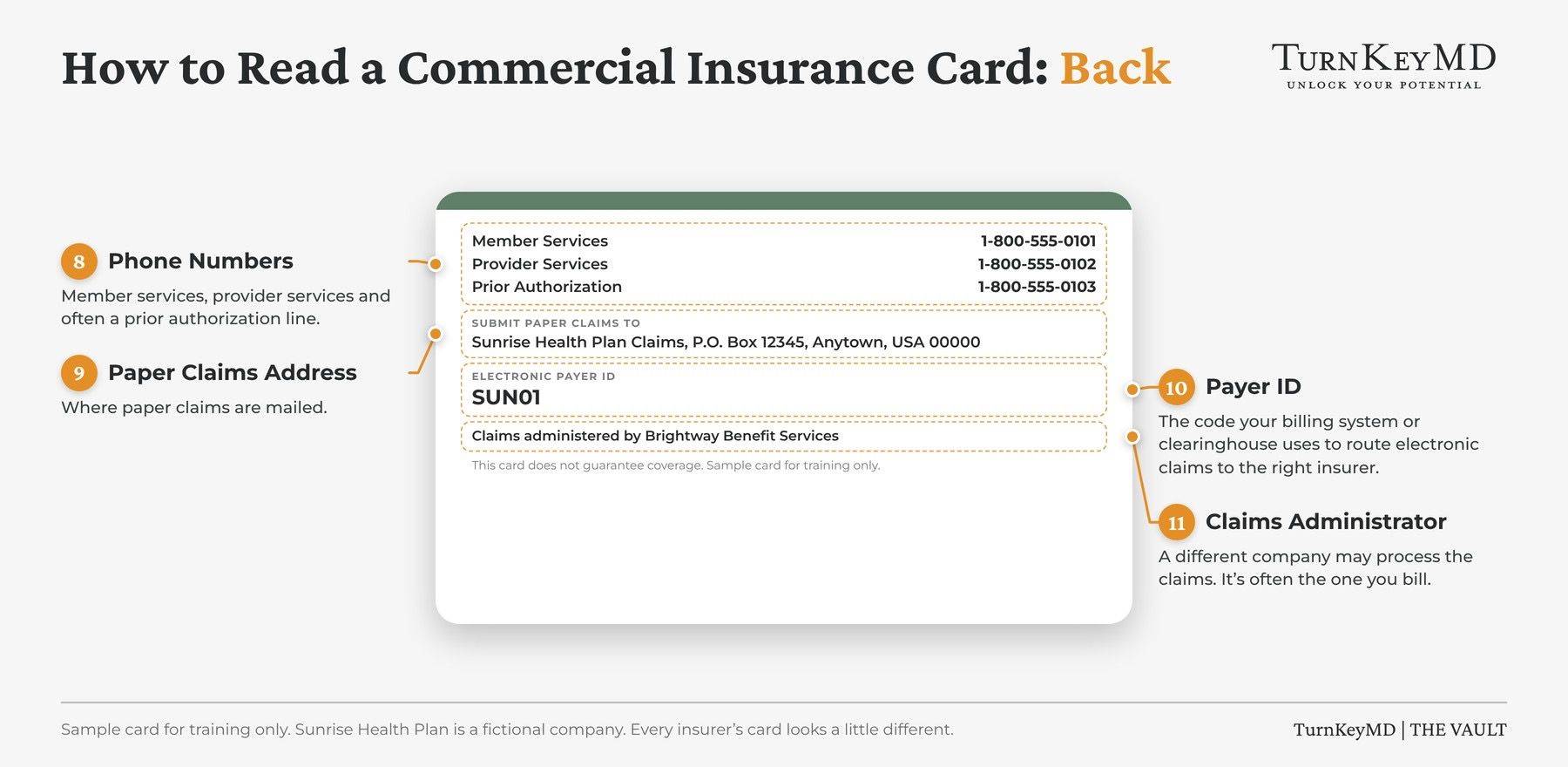
Step 8: Phone Numbers
Look for the member services and provider services phone numbers.
- Member services: Patients can call with questions about their coverage and benefits.
- Provider services: Your practice can call to verify coverage, clarify benefits, or ask questions about claims.
- Prior authorization: Some cards include a separate phone number for authorization questions and requests.
Step 9: Paper Claims Address
Find the mailing address for paper claims. This is where your practice sends claims when paper submission is required or appropriate. Don't assume that the address is the same as the insurance company's corporate mailing address. Use the address designated for claims.
Step 10: Payer ID
Look for the Payer ID used to route electronic claims. This number helps your billing system or clearinghouse direct claims to the correct payer. Not every insurance card displays an electronic Payer ID. If it's missing, check your clearinghouse's payer directory or contact provider services.
Step 11: Claims Administrator
Some commercial insurance plans use a separate company to administer benefits or process claims. That means the insurance company whose name appears on the front of the card may not be the company your practice bills. Look for a claims administrator or third-party administrator listed on the back. This company may be responsible for processing claims and is often the organization your practice needs to bill. Always confirm the correct billing destination before submitting claims.
Check-In Habits
Reading the card correctly is only part of the process. Consistent check-in habits help your practice keep insurance information accurate.
- Scan Both Sides at Every Visit. Capture the front and back of the patient's current insurance card according to your practice's procedures.
- Ask About Changes. Make it a habit to ask every patient: "Has anything changed with your insurance since your last visit?" Don't assume the information on file is still correct.
- Compare the Card With Your System. Review the insurance information already entered in your practice management system. Check for differences in the member ID, group number, payer, plan, and other relevant fields. Correct anything that doesn't match.
- Verify Eligibility Before the Visit. An insurance card doesn't prove that coverage is currently active. Verify eligibility before each visit and confirm benefits or plan requirements as needed. If something doesn't match, investigate before the patient is seen.
What to Check on a Commercial Insurance Card
| Information | Where to look | Why it matters |
|---|---|---|
| 1. Payer and plan name | Front | Identifies the insurance company and specific plan |
| 2. Member name and ID | Front | Identifies the covered member and helps prevent claim rejections |
| 3. Group number | Front | Helps identify the applicable employer or group plan |
| 4. Plan type (HMO, PPO, EPO, POS) | Front | Provides clues about referrals and network requirements |
| 5. Network name | Front | Helps determine whether your practice participates in the patient's network |
| 6. Copays | Front | Helps identify potential patient responsibility, subject to verification |
| 7. Rx BIN, PCN, and group | Front | Identifies pharmacy billing information, not the medical group number |
| 8. Phone numbers | Back | Provides member services, provider services, and available prior authorization contacts |
| 9. Paper claims address | Back | Identifies where applicable paper claims should be mailed |
| 10. Payer ID | Back | Helps route electronic claims to the correct payer |
| 11. Claims administrator | Back | Identifies another company that may process claims and may be the correct billing destination |
Remember: The card is a starting point. Always verify eligibility, benefits, network participation, and applicable billing requirements.
Frequently Asked Questions
What Is the Member ID on an Insurance Card?
The member ID is the identification number the insurance company uses to identify the covered member. Enter it exactly as printed, including any letters or prefixes. An incorrect member ID can cause a claim rejection.
What Is the Group Number on an Insurance Card?
The group number generally identifies the employer or organization sponsoring the insurance plan. It's often labeled "Group" or "Grp." Some individual insurance plans, including marketplace plans, may not have a group number.
What's the Difference Between a Copay and Coinsurance?
A copay is a fixed amount the patient pays for a covered service, such as $30 for an office visit. Coinsurance is a percentage of the allowed cost that the patient is responsible for, often after meeting a deductible. Insurance cards may show copays, but deductibles and coinsurance usually require separate benefits verification.
How Do I Know Whether Insurance Is Primary or Secondary?
An insurance card usually doesn't identify whether the coverage is primary or secondary. Ask the patient about other insurance coverage and follow applicable coordination of benefits rules. If the patient has more than one plan, verify both and determine the correct billing order.
How Is a Medicare Card Different From a Commercial Insurance Card?
Original Medicare cards are issued by the federal government and contain a Medicare Beneficiary Identifier rather than the typical commercial member and group information. Medicare Advantage plans are offered by private insurers and have their own cards. Always confirm which coverage is active and should be billed.
Does Having an Insurance Card Mean the Patient Has Active Coverage?
No. An insurance card doesn't guarantee active coverage or payment for services. Insurance can change or terminate, so your practice should verify eligibility before each visit and confirm benefits when needed.
What Information Is on the Back of an Insurance Card?
The back of a commercial insurance card typically includes member services and provider services phone numbers, a paper claims mailing address, and prior authorization contact information. Some cards also display the electronic Payer ID. If the Payer ID isn't listed, consult your clearinghouse or contact the payer.
When Should Front Desk Staff Ask for Help With an Insurance Card?
Ask a supervisor or experienced team member for help when the patient's information doesn't match, the card appears expired, eligibility can't be confirmed, the plan is unfamiliar, or the patient has multiple insurance plans. Addressing these questions before the visit can help prevent billing problems later.
Want More Practical Training for Your Whole Team?
This five-minute video is a small example of the training available inside The TurnKeyMD Vault.
The Vault gives your practice access to practical training, masterclasses, tools, templates, and resources to help you improve patient service, strengthen daily operations, and support your team.
Your membership includes access for your whole practice, so new hires and experienced team members can learn at their own pace. You can access resources on your computer or through the mobile app, with new resources added regularly.
Explore The VaultMEDICAL PRACTICE MANAGERS
Stop Building Everything From Scratch.
The Vault gives your practice ready-to-use policies, scripts, checklists, and staff training, built by someone who has guided independent practices for more than 30 years. Download it, make it yours, and get back to running the practice.
Explore The Vault See what's inside
✔ One membership covers your whole practice
✔ Includes the mobile app

MEET TANIA
"I want you to get to the point where, when something comes up, you think, 'I bet Tania has something for that.' Because chances are, I do."
I've spent more than 30 years guiding independent practices, working with owners, managers, and front desk teams across the country as they opened, grew, and got organized. Every time I helped a practice fix a problem, I kept the tool. The Vault is where I'm putting all of it, so you don't have to reinvent it.
Tania Chevalier, CMPE
Founder, TurnKeyMD
THE VAULT IS OPEN
Before you build it, check The Vault.
Join today and the next time something needs fixing, you'll already have the policy, the script, or the checklist ready to go.
Member Login
Helping you build a five-star, profitable medical practice with practical tools, better systems, and expert guidance.
Tania Chevalier, CMPE · Frisco, TX
Learn & Explore
Calm the Chaos: Weekly
One practical tip each Friday to help you lead better and protect revenue.

Stay Connected
Join my mailing list to receive free weekly tips and insights!